Silence the Noise: Why Every Podcaster Needs Lnkk.it Smart Links


You have recorded the perfect episode. The audio is crisp, the guest is hilarious, and the intro is fire. Now comes the hard part: sharing it. Do you send the Spotify link? The Apple Podcasts link? The YouTube link?
Stop guessing where your listeners live. With Lnkk.it Podcast Smart Links, you can share one link that rules them all.
The "fragmentation" Problem
Podcast listening habits are deeply personal.
• iOS users swear by Apple Podcasts.
• Android users love Google Podcasts or Spotify.
• Audiophiles might use Tidal or Deezer.
If you put a Spotify link in your Instagram bio, you are instantly alienating 50% of your potential audience (the Apple users). If you list 6 different links, your bio looks cluttered and desperate.
The Solution: Smart Detection
The Lnkk.it Podcast App acts as a universal adapter for your audio content.
When you paste any link (e.g., your Anchor or Spotify URL), our system instantly:
Auto-Fetches Metadata: We pull your cover art, episode title, and description.
Finds Platforms: We automatically detect where else your show is available.
Creates a Landing Page: We generate a beautiful, branded module that gives listeners the choice.
Feature Spotlight: The Embedded Player
Sometimes, you want to hook a listener before they commit to subscribing. Our Pro Modal feature allows you to embed a playable episode directly on your Lnkk.it.
Use Case: The "Teaser"
Upload a 2-minute "Best Of" clip as your latest episode. Visitors can hit play right inside Instagram or TikTok's browser, hear your voice, and get hooked immediately. Conversion rates skyrocket when people can "try before they buy."
How to Set It Up (In 60 Seconds)
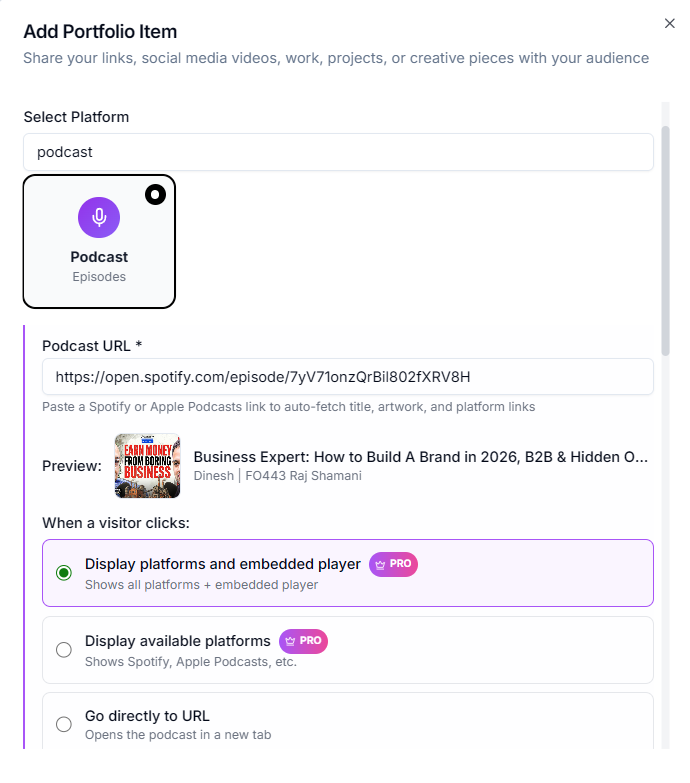
You don't need to be a tech wizard. If you can copy and paste, you can do this.
Step 1: Get Your Link
Go to your podcast host (Anchor, Libsyn, Buzzsprout) or just grab your show's Spotify URL.
Step 2: Add to Lnkk.it
Go to Dashboard → Apps → Podcast. Click "Add".
Step 3: Paste & Customize
Paste the URL. Watch as we magically pull in your cover art.
You can then choose your Display Mode:
Full Modal: The premium experience with embedded player.
Platforms Only: A clean list of buttons (Listen on Spotify, Listen on Apple).
Direct Link: Sends them straight to your preferred source.
SEO for Your Ears
Google is now indexing podcast episodes. By having a dedicated section on your Lnkk.it with your episode title and description, you are creating more surface area for search engines to find you.
Stop Losing Listeners
You work too hard on your audio to lose listeners because of a broken link. Streamline your sharing strategy today.
YOU MAY ALSO LIKE

Sold Out: The Ultimate Guide to Managing Events & Tours on Lnkk.it
Stop managing messy ticket links. Learn how to centralize your tour dates, workshops, and live shows into one beautiful feed. Increase ticket sales today.

Showcase Your Sound: The Ultimate Guide to the Lnkk.it Spotify App
Turn your bio link into an audio experience. Learn how to embed Spotify tracks, albums, and podcasts directly onto your Lnkk.it for higher engagement.

Musicians, Your Fans Are Getting Lost: How to Create the Perfect Artist Link in Bio
You have 8 streaming platforms but only 1 bio link. Learn how musicians use Lnkk.it to route fans to Spotify, Apple Music, merch, and tour dates—all from one smart link.