Protect Your Content with Advanced Locking on Your Bio Link


Your bio link page is more than a set of shortcuts—it's a storefront, a portfolio, a classroom, a ticket booth, and a private vault, all at once. But not everything on your page is meant for everyone. Some content is premium. Some is sensitive. Some is reserved for a hand-picked audience who earns access.
That's exactly why we built Advanced Locking—a PRO feature on Lnkk.it that lets you wrap any link, shop product, collaboration, event, or booking behind a gate your visitors must unlock before they can view or interact with it.
Why Lock Your Content?
Think about how the internet's biggest creators operate. They don't give everything away for free in one flat list. They create layers of value:
Exclusive discount codes shared only in a newsletter? Lock the shop link behind that code.
Age-restricted content like adult comedy shows, mature artwork, or 18+ events? Gate it with a date-of-birth check.
VIP booking sessions that only paid community members should see? Protect them with a password.
Sensitive content warnings for potentially triggering material? Let visitors consciously opt in.
With Advanced Locking, your page stays public and discoverable—but the content behind the lock is revealed only on your terms.
Four Lock Types, Infinite Control
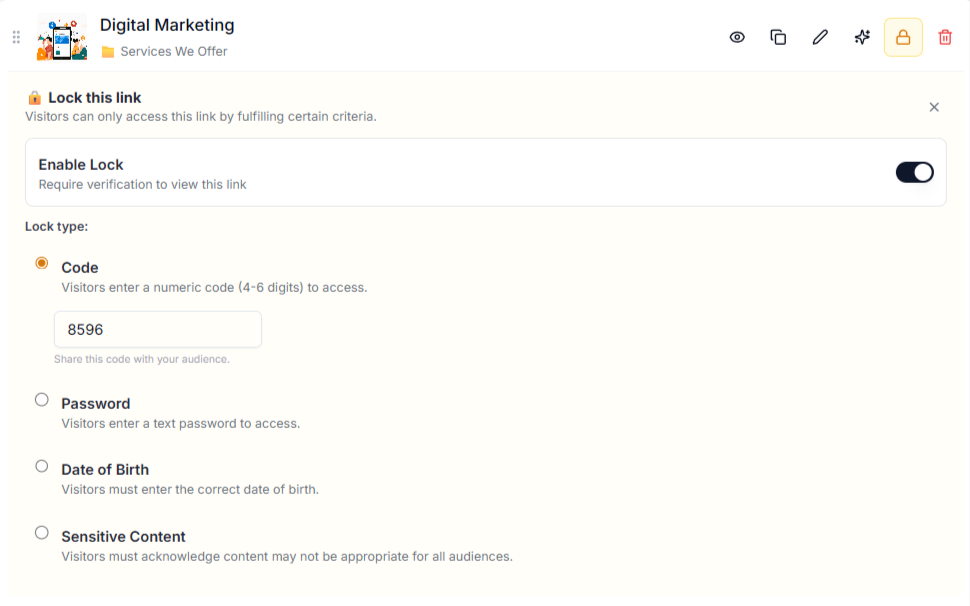
We didn't build a one-size-fits-all padlock. We gave you four distinct mechanisms, each designed for a different real-world scenario:
🔢 Code Lock
Set a 4–6 digit numeric code. Share it via email, DMs, or your private Discord. Only visitors who type the correct code can reveal the content. Perfect for:
Flash-sale discount links shared with subscribers only
Private download links for course material
Easter-egg content for superfans
🔑 Password Lock
Set a text password (case-insensitive for convenience). This works like a members-only door. Perfect for:
Paid community content drips
Client-only collaboration portals
Internal team resources on a public page
🎂 Date of Birth Lock
Visitors must enter their date of birth to gain access. The system verifies the exact date you set. This is ideal for:
Age-restricted event tickets (21+ parties, R-rated shows)
Mature content toggles for artists and comedians
Legal compliance for certain product categories
⚠️ Sensitive Content Warning
This isn't about keeping people out—it's about informed consent. Visitors see a customisable warning message and must explicitly acknowledge it before the content is revealed. Use it for:
Graphic photography or true-crime content
Mental health–related material
Any content that deserves a "viewer discretion advised" wrapper
Works Everywhere on Your Page
This isn't a half-baked feature limited to one section. Advanced Locking is available across every major content type on Lnkk.it:
Section What Gets Locked Links Individual links in your link list Shop Products Any product card in your built-in shop Collaborations Partnership or collaboration cards Events Individual event listings Bookings Specific booking session types
One consistent UI. One learning curve. Total coverage.
How to Set Up a Lock (In Under 60 Seconds)
Setting up a lock is absurdly simple. No code. No integrations. No third-party tools.
Step 1: Open the Live Editor
Navigate to your Lnkk.it dashboard and open the Live Editor. Find the item you want to lock—whether it's a link, a shop product, a collaboration, an event, or a booking type.
Step 2: Click the Lock Icon 🔒
Every item card has a Lock button in its action row (look for the lock icon with the PRO badge). Click it to expand the Lock Panel.
Step 3: Enable & Configure
Toggle Enable Lock on. Choose your lock type (Code, Password, Date of Birth, or Sensitive Content). Enter the value—a code, a password, a date, or a custom warning message. That's it. Your lock is live instantly.
Step 4: Share the Key
Distribute the code or password through whatever private channel makes sense for your audience—email, Telegram, Discord, Patreon, or even whispered at a live show. Your content stays invisible until they prove they belong.
What Visitors See
When a visitor encounters a locked item on your profile, the content is hidden behind a sleek lock gate that matches your page's theme colours. They'll see:
A lock icon and a prompt matching the lock type
An input field (for code, password, or DOB) or an acknowledgement button (for sensitive content)
Instant feedback on success or failure
Once unlocked, the content is revealed for the remainder of that browser session. If they reload the page, they'll need to unlock again—keeping your content protected on every visit.
Real-World Use Cases
🎤 Musicians & DJs
Lock your pre-save link behind a code you announce on stage. Only people who attended the live show get early access to the new single. Instant community-building.
🛍️ E-commerce Creators
Hide a secret product drop behind a password shared exclusively with your newsletter subscribers. Watch the open rates skyrocket.
📚 Coaches & Educators
Gate your premium booking calendar with a password so only paying clients can schedule sessions. No need for separate portals.
🎨 Artists & Photographers
Wrap NSFW or mature-content galleries behind a sensitive content warning. Stay compliant, stay professional, and still show your full range of work.
🎉 Event Promoters
Require a date-of-birth verification for 21+ event tickets. Simple age gating without complex third-party software.
Security & Privacy by Design
Every lock verification happens server-side through our API. Codes and passwords are never exposed in the browser's source code. The lock gate component renders before the content, meaning the actual data is never sent to the client until verification succeeds.
And because lock settings are stored in the same settings column as your other configurations, they are atomically saved alongside your content. No orphaned data, no stale locks.
A PRO Feature Worth the Badge
Advanced Locking is available exclusively to Lnkk.it PRO subscribers. It's one of over a dozen PRO perks—alongside Priority Animations, Custom Domains, Video Backgrounds, and Remove Branding—designed to give serious creators serious tools.
If you're ready to stop treating your bio link as a flat public utility and start treating it as a gated content experience, Advanced Locking is the upgrade you've been waiting for.
